Web Audio · no build · no audio files

Why a short loop can sound endless

Balatro's soundtrack never seems to start over. Some homepages bend their music as you move the mouse. This site rebuilds both so you can hear each part, then hands you a starter for your own page.


Two things I liked turned out to be one trick

Balatro: a loop with no seam

I played Balatro for hours and never heard the music end. There is no start and no finish, only new material appearing. The game's source shows why. Five tracks run in sync forever, everything plays at 0.7× speed, and your score adds layers on top.

nays.tech: music that follows the mouse

The homepage nays.tech bends its background loop as the cursor moves up and down. It feels alive and costs a few lines of code: a dead zone in the middle, a smoothstep curve, ±200 cents at the edges.

Both keep the audio running and never restart it. They change only volume, speed and pitch. That one rule is what hides the loop.
Three pages, about ten minutes

Each page has a start button, because browsers block sound until you click. Use headphones if you can.

One signal chain behind both

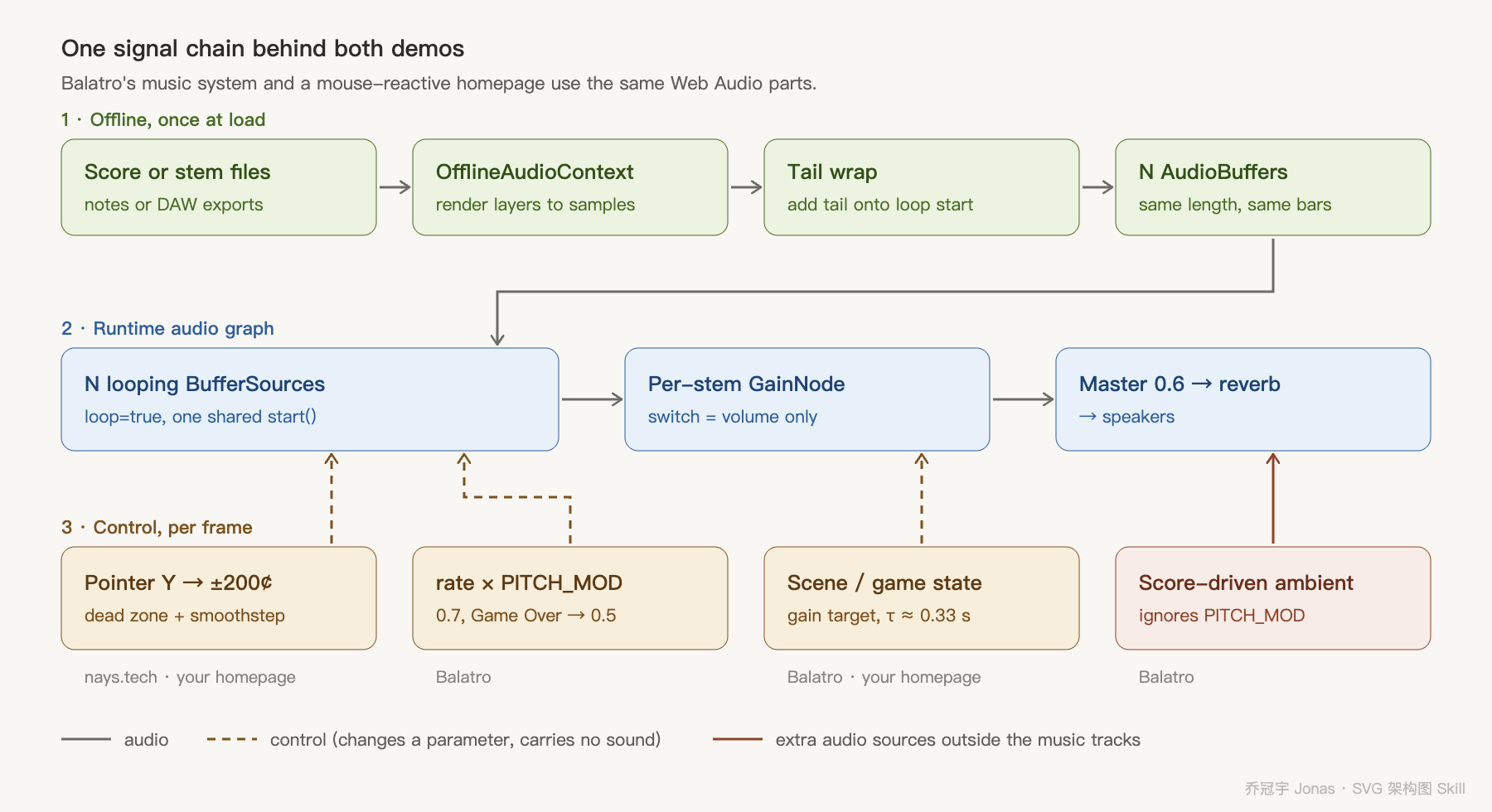
Render once, loop forever, and steer everything from a few control values per frame.

Signal chain: offline render with tail wrap, synced looping sources, per-stem gains, master and reverb, and per-frame control from pointer, rate and scene
Figure 1. The same chain drives the Balatro demo, the mouse lab and the starter.

1. Fold the tail

Render every stem to the same length. Add the reverb tail that rings past the end onto the start, so the seam sounds like any other moment.

2. Never restart

Start all stems at one shared time with loop = true. A scene change only fades volumes, so the playhead never jumps.

3. Bend the tape

Change playbackRate or detune. Pitch and speed move together like tape, and the loop length keeps shifting.

Read the full write-up with source references

Add it to your homepage

Copy src/endless-loop.js next to your page. Export your stems from a DAW with a few seconds of tail, then:

<button id="play">▶ Play sound</button>
<script type="module">
import { createEndlessLoop } from './endless-loop.js';

const loop = await createEndlessLoop({
  stems: [
    { url: 'pad.mp3',   loopSeconds: 9.6 },
    { url: 'drums.mp3', loopSeconds: 9.6, gain: 0 },  // silent until a scene turns it up
  ],
  rate: 0.85,   // optional Balatro-style slowdown
  range: 200,   // max mouse bend in cents
});

document.getElementById('play').onclick = () => { loop.start(); loop.followPointer(); };
// later: loop.setScene([1, 1]); loop.setRate(0.5); loop.mute(true);
</script>